Embroidery is fun. It is art made with thread. But when you use an embroidery machine, you need more than just a pretty design. You need the right file. If the file is wrong, your machine will not stitch well. The design may look broken or messy.This is where the Embroidery File Format becomes very important.
It tells the machine how to stitch. It shows where to place each stitch. It also tells the machine when to stop, trim, or change colors. If you use the wrong format, the design will not work.In this guide, I will explain the most popular embroidery file formats. I have worked with many machines and designs. I have fixed bad files. I have tested many formats. So I will share what really works. Let’s make this simple and clear.
What Is an Embroidery File Format?
An embroidery file format is a special type of file. It is not like JPG or PNG. Those are image files. They only show a picture.
An embroidery file has stitch data. It tells the machine:
-
Where to stitch
-
How many stitches to make
-
What type of stitch to use
-
When to change thread color
-
When to trim the thread
Without this data, the machine cannot work.
Think of it like a map. The file is the map. The machine follows it step by step.
Why File Formats Matter So Much
Many beginners make one big mistake. They download a design. Then they try to load it into their machine. But it does not open.
Why? Because the format is wrong.
Each embroidery machine brand uses its own format. Some machines can read more than one type. But many can only read one or two types.
If you choose the wrong format:
-
The design will not open
-
The machine may show an error
-
The stitches may look strange
-
The design size may change
I have seen this happen many times. That is why I always tell my clients to check their machine manual first.
The Most Popular Embroidery File Formats
Now let’s look at the most common formats. These are used all over the world.
DST – The Industry Standard
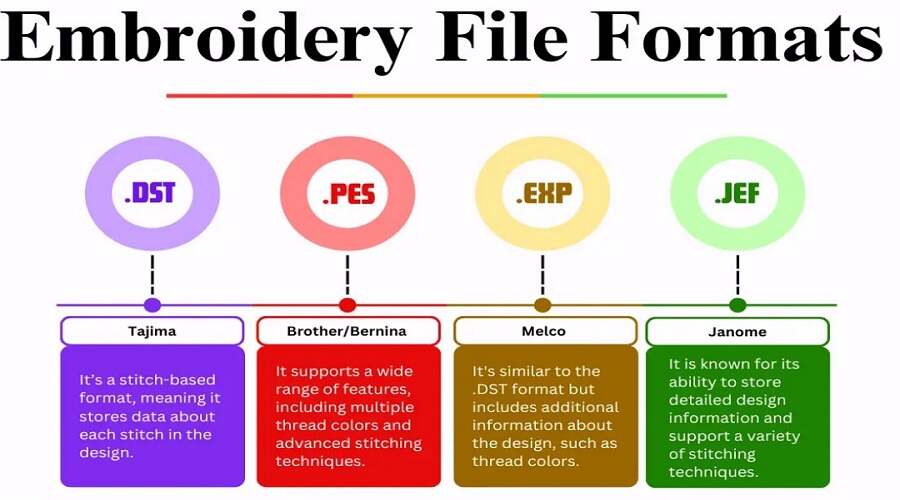
DST is one of the oldest formats. It stands for Data Stitch Tajima. It was made for Tajima machines.
Why DST Is Popular
-
It works with many machine brands
-
It is simple and stable
-
Most commercial machines support it
Many big embroidery shops use DST. I have used it in large production runs. It works well for logos and simple designs.
Limits of DST
DST does not store color information well. It mainly stores stitch points. So you may not see color details in your software.
But it is strong and reliable. That is why many professionals still trust it.
PES – For Brother and Babylock
PES is very popular. It is used by Brother and Babylock machines.
If you own a Brother home machine, you will likely use PES.
Why People Like PES
-
It stores color data
-
It keeps design details
-
It works well with home machines
I often send PES files to home users. They are easy to load using USB. The design usually shows clearly on the machine screen.
Best For
-
Home embroidery
-
Small businesses
-
Hobby users
JEF – For Janome Machines
JEF is used by Janome embroidery machines.
If you have a Janome machine, this is your main format.
What Makes JEF Special
-
It supports color changes
-
It fits Janome hoop sizes
-
It runs smoothly on Janome models
I once worked with a client who had a Janome Memory Craft machine. The design did not stitch right in DST. But when I converted it to JEF, it worked perfectly.
This shows why using the right format matters.
EXP – Melco and Bernina
EXP is used by Melco and Bernina machines.
It is simple like DST. It stores stitch data but not much color info.
When to Use EXP
-
For Melco machines
-
For older Bernina models
-
When simple stitch data is enough
It is clean and direct. Many commercial users like it.
VP3 – Husqvarna and Viking
VP3 is used by Husqvarna Viking and some Pfaff machines.
It is more advanced than older formats.
Benefits of VP3
-
Stores color details
-
Shows thread brand info
-
Keeps design size data
I like VP3 because it keeps more design information. It feels modern and complete.
XXX – Singer Format
XXX files are used by Singer embroidery machines.
They are common in home embroidery.
Good to Know
-
Works well with Singer models
-
Stores basic stitch and color data
-
Easy to transfer by USB
If you own a Singer machine, always ask for XXX format.
How to Choose the Right Format
Choosing the right format is not hard. Just follow these steps.
Step 1: Check Your Machine Brand
Look at your machine manual. It will list supported formats.
Step 2: Know Your Model
Some brands support more than one format. But the model number helps you be sure.
Step 3: Ask Your Digitizer
Always tell your digitizer your machine brand and model.
At Embroidery Digitizing Services in USA – Digitizing Buddy, we always ask clients for their machine details first. This helps us send the correct format. It saves time and avoids errors.
Can You Convert Embroidery File Formats?
Yes, you can. But be careful.
There are embroidery software programs that convert files. But conversion is not always perfect.
What Can Go Wrong
-
Stitches may shift
-
Colors may change
-
Size may not match
-
Small details may break
I have tested many conversions. Simple designs convert well. But complex logos with small text may lose quality.
That is why it is better to get the right format from the start.
Difference Between Image Files and Embroidery Files
Many people think they can stitch a JPG file. But that is not true.
Image Files
-
JPG
-
PNG
-
BMP
These are picture files. They do not have stitch data.
Embroidery Files
-
DST
-
PES
-
JEF
-
EXP
-
VP3
-
XXX
These have stitch commands.
Before stitching, a logo must be digitized. This means turning the image into stitch data.
At Embroidery Digitizing Services in USA – Digitizing Buddy, we digitize logos by hand using software. We do not auto-convert images. This gives better stitch quality and clean results.
Tips From Real Experience
I have worked with many clients. I have seen many mistakes. Here are some simple tips.
Always Test Stitch
Before full production, stitch one sample. This helps you see:
-
Thread breaks
-
Puckering
-
Wrong size
-
Wrong colors
A test run saves money.
Use the Right Hoop Size
Even if the file format is correct, the hoop size must match the design.
If the design is too big, the machine will not stitch it.
Do Not Resize Too Much
Resizing in the machine can damage stitch density. If you need a new size, ask for re-digitizing.
File Format for Commercial vs Home Use
There is a small difference between commercial and home embroidery.
Commercial Machines
-
Often use DST
-
Handle large designs
-
Run for long hours
Home Machines
-
Use PES, JEF, XXX, or VP3
-
Good for small projects
-
Easier to operate
I have worked on both. Commercial machines are fast and strong. But home machines are great for small shops and hobby work.
Why Quality Digitizing Is More Important Than Format
The format matters. But digitizing quality matters more.
A poorly digitized design will look bad in any format.
Good digitizing includes:
-
Proper stitch direction
-
Correct density
-
Clean underlay
-
Smart pathing
When these are done right, the design looks sharp and clean.
At Embroidery Digitizing Services in USA – Digitizing Buddy, we focus on clean stitch paths and balanced density. We test designs before delivery. This builds trust with our clients.
Common Questions About Embroidery File Formats
Can One File Work on All Machines?
No. Each machine reads specific formats.
Is DST the Best Format?
DST is widely used. But it is not always the best for home machines.
Can I Open Embroidery Files on My Phone?
Usually no. You need embroidery software.
Do File Formats Affect Stitch Quality?
The format itself does not change quality much. The digitizing does.
Final Thoughts
Embroidery file formats may sound confusing at first. But they are simple once you understand them.
Each format has a purpose. Each machine has its own needs.
The key points to remember:
-
Always check your machine brand
-
Use the correct format
-
Avoid random conversions
-
Test stitch before full production
From my real work experience, I can say this. Most embroidery problems come from wrong files or poor digitizing. When both are correct, embroidery becomes smooth and stress free.
If you are serious about embroidery, take time to learn about formats. It will save you time, money, and fabric.
Embroidery is not just about thread. It is about precision. And the right file format is the first step toward perfect stitches.